Acrux Studio vs Streamlabs
Streamlabs Desktop made streaming approachable at a time when OBS was intimidating, and its overlay library is still the largest around. The trade has always been weight and price. Here is where Streamlabs is still the better choice, where Acrux works differently, and what you would be giving up.
Where Streamlabs is still the better choice
-
The overlay and theme library
Hundreds of finished themes you can click into place. Acrux has nothing like it and does not pretend to.
-
Much richer alerts
Streamlabs alerts do images, video, GIFs, and a whole widget set on top. Acrux alerts are a line of text with a sound. If your alerts are part of your channel personality, Streamlabs wins this outright.
-
It runs on macOS too
Windows and macOS. Acrux is Windows only today.
-
It is built on OBS
So a lot of OBS plugins and most OBS knowledge carry straight over, and it can import an OBS setup. Acrux has no plugin system and cannot import scenes yet.
-
A whole suite around it
Tip pages, a chatbot, merch, a mobile app, and a video editor all sit around the desktop app. Acrux is one desktop app and nothing else.
Where Acrux works differently
-
One window instead of a suite
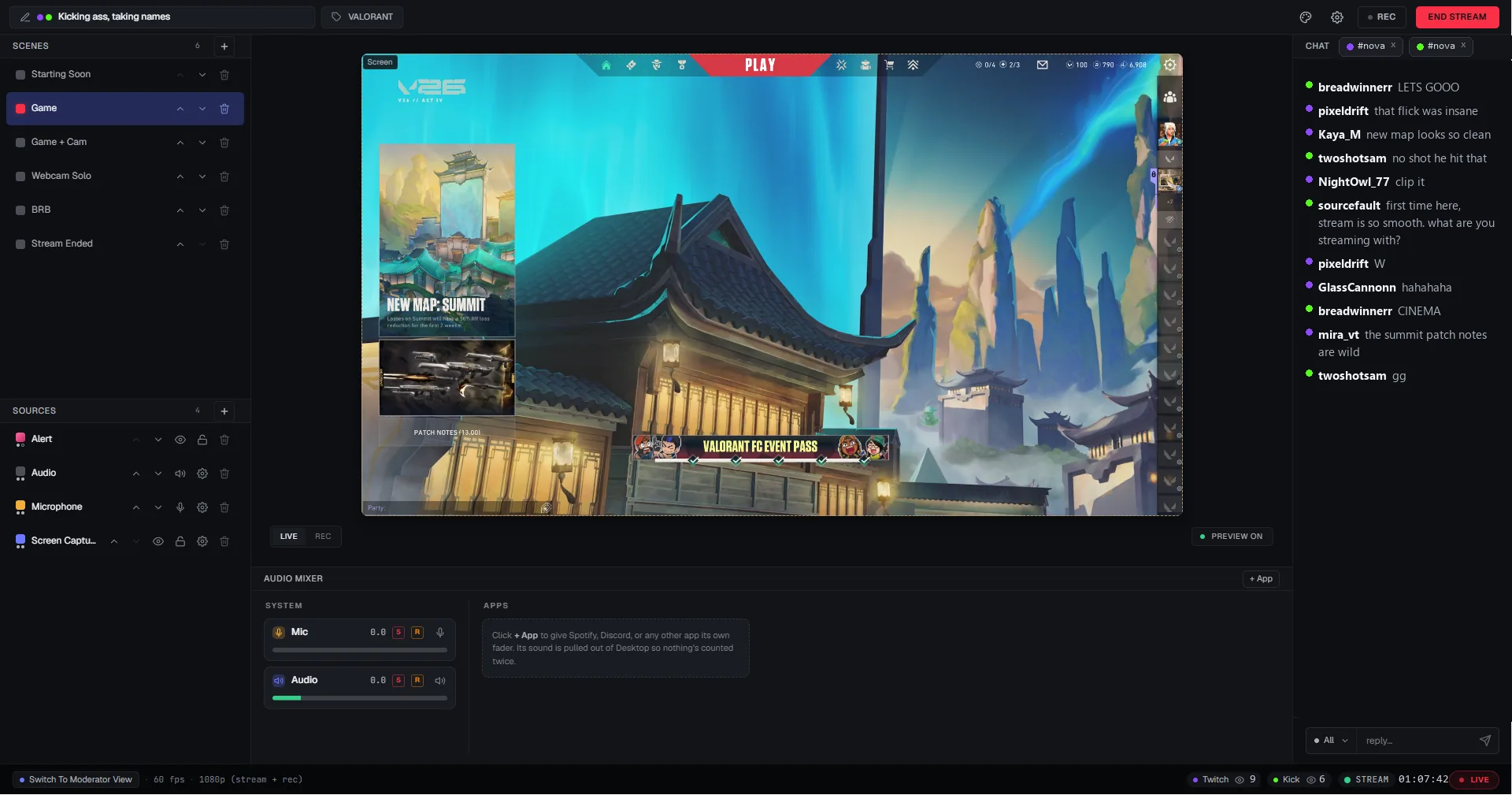
Scenes, sources, the audio mixer, chat, alerts, moderation, and the Go Live button in one window. Nothing to open in a browser and nothing to alt-tab to in the middle of a game.
-
No watermark, at any tier
The free Streamlabs tier puts a watermark on your stream. Acrux does not have one to remove, because it never puts one there.
-
Multistreaming is not a subscription
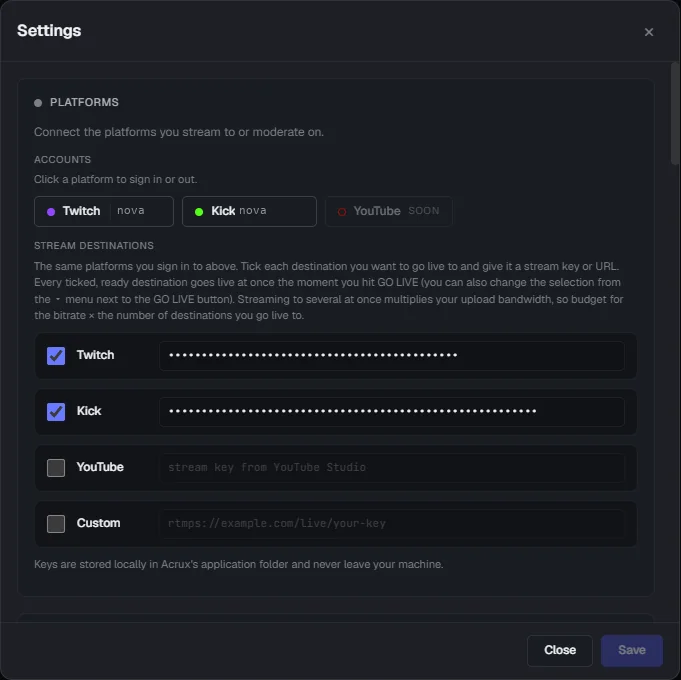
Going live to two platforms at once is free in Acrux, whichever two you pick. A Pro plan is planned for three or more destinations at the same time, and two stays free.
-
Set up once, then go live
From a fresh install: pick "I'm a streamer", sign in to Twitch, press "Let's Go", then press "Go Live". That is four clicks on the default settings, with no scene to build first and nothing to wire up.
-
Nothing watching over your shoulder
Acrux has no analytics and no telemetry in it, and it does not phone home. Your scenes, your keys, and your settings stay on your PC.
-
Your mods get their own view
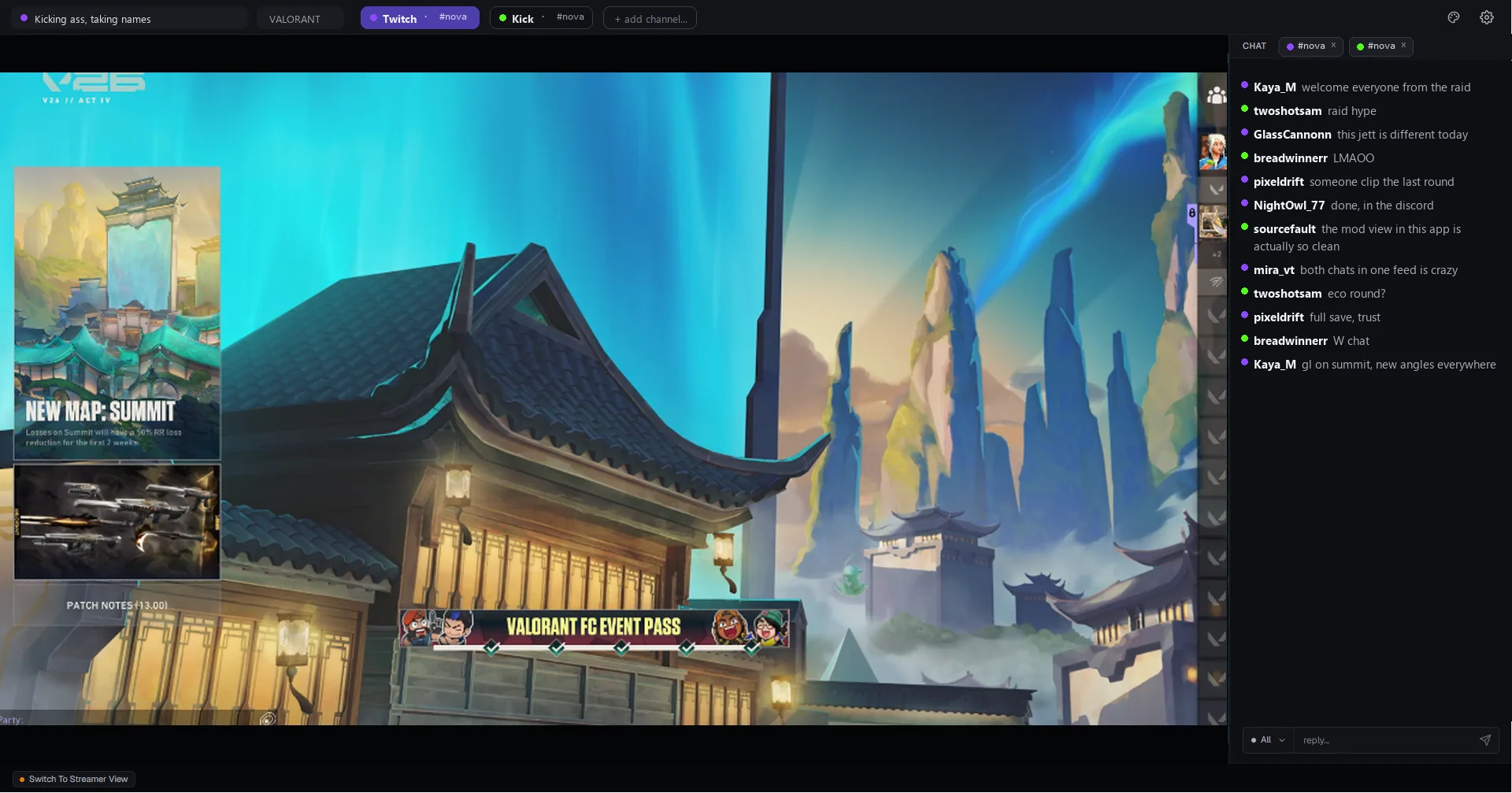
A full moderator view is built into the app, so the people helping you run your channel are not an afterthought.
Side by side
Marked honestly, ours and theirs alike. We would rather you found the rows Streamlabs takes here than after installing.
| Feature ahead | Acrux Studio | Streamlabs |
|---|---|---|
| Cost, platforms, and privacy | ||
| Price | Ahead. Free, no watermark, no time limit | Free tier with a watermark, or Ultra at $27 a month |
| Watermark on the free tier | Ahead. None | Yes |
| Runs on | Windows | Ahead. Windows and macOS |
| Telemetry | Ahead. None, and it does not phone home | Collected |
| Going live | ||
| From install to first stream | Four clicks on the defaults, and no Acrux account | A short onboarding too, and it signs you into a Streamlabs account |
| What you need besides the app | Nothing | Nothing, though widgets and alerts are set up in the Streamlabs dashboard |
| Windows open while streaming | Ahead. One | The app, plus the dashboard in a browser for widgets and tips |
| Multistreaming | Two destinations at once, free | Two on the free tier, more with Ultra |
| Vertical 9:16 canvas | Built in, its own layout in every scene | Dual Output, free tier included |
| Adaptive bitrate and frame rate | Ahead. Both, with automatic recovery | Bitrate |
| Your audience | ||
| Twitch, YouTube, and Kick chat | Ahead. Merged in one panel, with moderation | Per platform, or a browser dock |
| Alerts | Built in, a line of text with a sound | Ahead. Built in, with images, video, and a large widget library |
| Moderator view | Ahead. Built in | Mods use the platform's own mod view in a browser |
| Recording and production | ||
| Recording and clips | MP4 plus a replay buffer | Yes, both |
| Per-app audio | Ahead. One mixer, a fader per app | Each app added as its own source |
| Insights after a stream | Built into the app, on one timeline | In the Streamlabs dashboard |
| VTuber avatars | Ahead. VTube Studio or VSeeFace, no green screen | Capture your avatar app as a source |
| Making it your own | ||
| Overlay and theme library | None | Ahead. Hundreds of themes |
| Plugins | No plugin system | Ahead. Most OBS plugins work |
| Import an existing OBS setup | Not yet | Ahead. Yes |
| Chroma key and color grading | Not yet | Ahead. Yes |
Streamlabs pricing and tier limits checked July 2026. Ultra is $27 a month or $189 a year at the time of writing.
What you would give up
- The theme library. There is no equivalent in Acrux, so a themed look means building it yourself or bringing your existing overlay in as a browser source.
- Rich alerts. Acrux alerts are text and a sound. No images, no video, no GIFs.
- Your existing setup does not come across yet. Streamlabs can import from OBS and Acrux cannot import from either one, so you would lay your scenes out again by hand.
- macOS. Acrux is Windows only.
- The rest of the suite: tip pages, the chatbot, merch, and the mobile app all stay where they are.
- TikTok is stream key only, so its title and chat stay outside the app. Twitch, YouTube, and Kick all have full sign-in.
Questions
- Is Acrux Studio cheaper than Streamlabs Ultra?
- Everything Acrux does today is free, so yes, but the fairer answer is that they are not the same product. Ultra buys you a suite: tip pages, a chatbot, a video editor, merch, cloud multistreaming, and a very large theme library. Acrux is one desktop app that does the broadcast part well and leaves the rest alone.
- Does Acrux put a watermark on my stream?
- No, and there is no tier where it does. There is nothing to pay to remove.
- Can I bring my Streamlabs overlays and alerts across?
- Your overlays, yes. They work as browser sources the same way they do in Streamlabs and OBS, and scenes sharing one overlay share a single browser behind the scenes, so switching scenes does not reload it or drop your alert connections. Your Streamlabs scene layouts do not come across yet.
- Is Acrux Studio lighter than Streamlabs?
- We are not putting a number on that until we have measured it properly across more than one machine, and we would rather leave the row off this page than guess at it. What we can tell you is how it is built: Acrux is a native app with no browser inside it, and your graphics card composes and encodes the frames.
- Is Acrux Studio free?
- Yes. Streaming, recording, clips, scenes, chat, alerts, the moderator view, and your stream diagnostics are all free, with no watermark and no time limit. A Pro plan is planned for power workflows on top of that, like streaming to three or more places at once. Nothing the app does today moves behind it.
- Will my Streamlabs or StreamElements overlays still work?
- Yes, as browser sources, the same way they work today. Scenes that use the same overlay share one browser behind the scenes, so switching scenes does not reload the overlay or drop your alert connections.
- Which platforms can Acrux stream to?
- Twitch, YouTube, and Kick with full sign-in: stream keys arrive on their own, chat from all three merges into one panel with moderation, and title, category, and tags are set from one place. TikTok works with a stream key today, in widescreen or portrait.
- Does Acrux track what I do?
- No. The app has no analytics or telemetry in it and it does not phone home. The website uses cookieless analytics that count visits and referrers, nothing personal.
Try it on one quiet stream.
Keep Streamlabs installed. Nothing here touches it, and if Acrux is not for you, you have lost an evening.
Get Acrux Studio on the Microsoft Store